Box-shadow, one of CSS3′s best new features
box-shadow property allows designers to easily implement multiple drop shadows (outer or inner) on box elements, specifying values for color, size, blur and offset.Browser support is growing of late with Mozilla (Firefox), Webkit (Safari/Chrome/Konqueror), Opera and the IE9 Platform Preview all offering a decent implementation of the spec, although Mozilla and Webkit still require their respective
-moz- and -webkit- prefixes (note Mozilla Firefox 4.0+ no longer requires the -moz- prefix).Here’s a basic example:
Firefox, Safari/Chrome, Opera and IE9 users should see a grey fading shadow under this box.
In theory, the code for this is straightforward:
#example1 {
box-shadow: 10px 10px 5px #888;
}
box-shadow: 10px 10px 5px #888;
}
But for the moment, as with many other ‘experimental’ CSS3 properties, you’ll need to use the following prefixes to support Mozilla and Webkit:
#example1 {
-moz-box-shadow: 10px 10px 5px #888;
-webkit-box-shadow: 10px 10px 5px #888;
box-shadow: 10px 10px 5px #888;
}
-moz-box-shadow: 10px 10px 5px #888;
-webkit-box-shadow: 10px 10px 5px #888;
box-shadow: 10px 10px 5px #888;
}
How it Works
The
box-shadow property can accept a comma-serparated list of shadows, each defined by 2-4 length values (specifying in order the horizontal offset, vertical offset, optional blur distance and optional spread distance of the shadow), an optional color value and an optional ‘inset‘ keyword (to create an inner shadow, rather than the default outer shadow).The Syntax:
box-shadow: none | <shadow> [ , <shadow> ]*
<shadow> = inset? && [ <length>{2,4} && <color>? ]
<shadow> = inset? && [ <length>{2,4} && <color>? ]
Examples:
box-shadow: 10px 10px;
box-shadow: 10px 10px 5px #888;
box-shadow: inset 2px 2px 2px 2px black;
box-shadow: 10px 10px #888, -10px -10px #f4f4f4, 0px 0px 5px 5px #cc6600;
box-shadow: 10px 10px 5px #888;
box-shadow: inset 2px 2px 2px 2px black;
box-shadow: 10px 10px #888, -10px -10px #f4f4f4, 0px 0px 5px 5px #cc6600;
Let’s first look at how to create a basic outer shadow, before going on to look at the inset keyword, layering multiple shadows and how to spice up your shadows with RGBa colors(?).
Creating a basic drop shadow
By default, shadows are drawn on the outside of elements. According to the specification;
An outerbox-shadowcasts a shadow as if theborder-boxof the element were opaque. The shadow is drawn outside the border edge only: it is clipped inside theborder-boxof the element.
The first step is to define the shape of the shadow by specifying 2-4 length values.
The first value defines the horizontal offset of the shadow, with a positive value offseting the shadow to the right of the element, and a negative value to the left.
The second value defines the vertifical offset of the shadow, with a positive value offsetting the shadow from the bottom of the element, and a negative value from the top.
If supplied, an optional third value defines the blur distance of the shadow. Only positive values are allowed, and the larger the value, the more the shadow’s edge is blurred. The specification does not include an exact algorithm for how the blur distance should be calculated, however it does elaborate as follows:
…for a long, straight shadow edge, this should create a color transition the length of the blur distance that is perpendicular to and centered on the shadow’s edge, and that ranges from the full shadow color at the radius endpoint inside the shadow to fully transparent at the endpoint outside it.
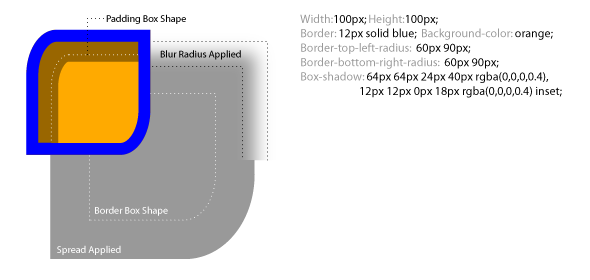
An optional fourth value can be supplied to define the spread distance of the shadow. A positive value will cause the shadow shape to expand in all directions, while a negative value will cause the shadow shape to contract. The specification goes into much greater detail on how the shadow shape is calculated as follows:
If a spread distance is defined, the shadow is expanded outward or contracted inward by an operation equivalent to applying twice the absolute value of the spread value to a blur operation as defined below and thresholding the result such that for a positive spread distance all non-transparent pixels are given the full shadow color and for a negative spread distance all non-opaque pixels are made transparent. The UA may approximate this operation by taking an outward outset of the specified amount normal to the original shadow perimeter. Alternatively the UA may approximate the transformed shadow perimeter shape by outsetting (insetting, for inner shadows) the shadow’s straight edges by the spread distance and increasing (decreasing, for inner shadows) and flooring at zero the corner radii by the same amount. (The UA may even combine these methods, using one method for outer shadows and another for inner ones.) For corners with a zero border-radius, however, the corner must remain sharp—the operation is equivalent to scaling the shadow shape. In any case, the effective width and height of the shadow shape is floored at zero. (A zero-sized shadow shape would cause an outer shadow to disappear, and an inner shadow to cover the entire padding-box.)
The diagram below (taken from the W3C Backgrounds and Borders Candidate Recommendation) offers a good example of the effects of spread and blur on the shadow:
An optional color value can also be supplied, directly after the 2-4 length values, to define the shadow’s color. If not supplied, a UA-chosen default should be applied, however, whilst in Firefox/Opera/IE9 the default color is black, in Safari/Chrome (webkit) no shadow is visible unless a color is specified.
Here are a few examples of shadows with differing offsets, spread and blur.
Examples:
A
B
C
D
E
F
Example A shows a shadow offset to the left and top by 5px:
#Example_A {
-moz-box-shadow: -5px -5px #888;
-webkit-box-shadow: -5px -5px #888;
box-shadow: -5px -5px #888;
}
-moz-box-shadow: -5px -5px #888;
-webkit-box-shadow: -5px -5px #888;
box-shadow: -5px -5px #888;
}
Example B shows the same shadow with a blur distance of 5px:
#Example_B {
-moz-box-shadow: -5px -5px 5px #888;
-webkit-box-shadow: -5px -5px 5px #888;
box-shadow: -5px -5px 5px #888;
}
-moz-box-shadow: -5px -5px 5px #888;
-webkit-box-shadow: -5px -5px 5px #888;
box-shadow: -5px -5px 5px #888;
}
Example C shows the same shadow with a spread distance of 5px:
#Example_C {
-moz-box-shadow: -5px -5px 0 5px #888;
-webkit-box-shadow: -5px -5px 0 5px#888;
box-shadow: -5px -5px 0 5px #888;
}
-moz-box-shadow: -5px -5px 0 5px #888;
-webkit-box-shadow: -5px -5px 0 5px#888;
box-shadow: -5px -5px 0 5px #888;
}
Example D shows the same shadow with both a blur distance of 5px and a spread distance of 5px:
#Example_D {
-moz-box-shadow: -5px -5px 5px 5px #888;
-webkit-box-shadow: -5px -5px 5px 5px#888;
box-shadow: -5px -5px 5px 5px #888;
}
-moz-box-shadow: -5px -5px 5px 5px #888;
-webkit-box-shadow: -5px -5px 5px 5px#888;
box-shadow: -5px -5px 5px 5px #888;
}
Example E shows a shadow with no offset and a blur distance of 5px:
#Example_E {
-moz-box-shadow: 0 0 5px #888;
-webkit-box-shadow: 0 0 5px#888;
box-shadow: 0 0 5px #888;
}
-moz-box-shadow: 0 0 5px #888;
-webkit-box-shadow: 0 0 5px#888;
box-shadow: 0 0 5px #888;
}
Example F shows a shadow with no offset and both a blur distance of 5px and a spread distance of 5px:
#Example_F {
-moz-box-shadow: 0 0 5px 5px #888;
-webkit-box-shadow: 0 0 5px 5px#888;
box-shadow: 0 0 5px 5px #888;
}
-moz-box-shadow: 0 0 5px 5px #888;
-webkit-box-shadow: 0 0 5px 5px#888;
box-shadow: 0 0 5px 5px #888;
}
Creating an inner shadow with the ‘inset’ keyword
An optional ‘
inset‘ keyword can be supplied, preceding the length and color values. If present, this keyword causes the shadow to be drawn inside the element. According to the specification:An inner box-shadow casts a shadow as if everything outside the padding edge were opaque. The inner shadow is drawn inside the padding edge only: it is clipped outside the padding box of the element.
Here are the same examples as above, this time with the ‘
inset‘ keyword present.Examples:
G
H
I
J
K
L
Example G shows an inner shadow offset to the left and top by 5px:
#Example_G {
-moz-box-shadow: inset -5px -5px #888;
-webkit-box-shadow: inset -5px -5px #888;
box-shadow: inset -5px -5px #888;
}
-moz-box-shadow: inset -5px -5px #888;
-webkit-box-shadow: inset -5px -5px #888;
box-shadow: inset -5px -5px #888;
}
Example H shows the same inner shadow with a blur distance of 5px:
#Example_H {
-moz-box-shadow: inset -5px -5px 5px #888;
-webkit-box-shadow: inset -5px -5px 5px #888;
box-shadow: inset -5px -5px 5px #888;
}
-moz-box-shadow: inset -5px -5px 5px #888;
-webkit-box-shadow: inset -5px -5px 5px #888;
box-shadow: inset -5px -5px 5px #888;
}
Example I shows the same inner shadow with a spread distance of 5px:
#Example_I {
-moz-box-shadow: inset -5px -5px 0 5px #888;
-webkit-box-shadow: inset -5px -5px 0 5px#888;
box-shadow: inset -5px -5px 0 5px #888;
}
-moz-box-shadow: inset -5px -5px 0 5px #888;
-webkit-box-shadow: inset -5px -5px 0 5px#888;
box-shadow: inset -5px -5px 0 5px #888;
}
Example J shows the same inner shadow with both a blur distance of 5px and a spread distance of 5px:
#Example_J {
-moz-box-shadow: inset -5px -5px 5px 5px #888;
-webkit-box-shadow: inset -5px -5px 5px 5px#888;
box-shadow: inset -5px -5px 5px 5px #888;
}
-moz-box-shadow: inset -5px -5px 5px 5px #888;
-webkit-box-shadow: inset -5px -5px 5px 5px#888;
box-shadow: inset -5px -5px 5px 5px #888;
}
Example K shows an inner shadow with no offset and a blur distance of 5px:
#Example_K {
-moz-box-shadow: inset 0 0 5px #888;
-webkit-box-shadow: inset 0 0 5px#888;
box-shadow: inner 0 0 5px #888;
}
-moz-box-shadow: inset 0 0 5px #888;
-webkit-box-shadow: inset 0 0 5px#888;
box-shadow: inner 0 0 5px #888;
}
Example L shows an inner shadow with no offset and both a blur distance of 5px and a spread distance of 5px:
#Example_L {
-moz-box-shadow: inset 0 0 5px 5px #888;
-webkit-box-shadow: inset 0 0 5px 5px#888;
box-shadow: inset 0 0 5px 5px #888;
}
-moz-box-shadow: inset 0 0 5px 5px #888;
-webkit-box-shadow: inset 0 0 5px 5px#888;
box-shadow: inset 0 0 5px 5px #888;
}
Layering multiple shadows
The
box-shadow property allows elements to have multiple shadows, specified by a comma seperated list. When more than one shadow is specified, the shadows are layered front to back, as in the following example.Example:
M
Example M shows five shadows specified in the following order; firstly a black shadow with a spread distance of px and a blur distance of px, secondly a lime shadow offset to the top right, thirdly a red shadow offset to the bottom right with a blur distance applied, fourthly a yellow shadow offset to the bottom left, and lastly a blue shadow offset to the top left with a blur distance applied:
#Example_M {
-moz-box-shadow: 0 0 10px 5px black, 40px -30px lime, 40px 30px 50px red, -40px 30px yellow, -40px -30px 50px blue;
-webkit-box-shadow: 0 0 10px 5px black, 40px -30px lime, 40px 30px 50px red, -40px 30px yellow, -40px -30px 50px blue;
box-shadow: 0 0 10px 5px black, 40px -30px lime, 40px 30px 50px red, -40px 30px yellow, -40px -30px 50px blue;
}
-moz-box-shadow: 0 0 10px 5px black, 40px -30px lime, 40px 30px 50px red, -40px 30px yellow, -40px -30px 50px blue;
-webkit-box-shadow: 0 0 10px 5px black, 40px -30px lime, 40px 30px 50px red, -40px 30px yellow, -40px -30px 50px blue;
box-shadow: 0 0 10px 5px black, 40px -30px lime, 40px 30px 50px red, -40px 30px yellow, -40px -30px 50px blue;
}
Spicing up shadows with RGBa color & border-radius
The
box-shadow property can be further enhanced using CSS3 RGBa colors to create shadows with differing levels of opacity, as demonstrated by the examples below.Examples:
N
O
P
Example N shows a black shadow, specified using standard RGB color, offset to the right and bottom by 5px:
#Example_N {
-moz-box-shadow: 5px 5px rgb(0,0,0);
-webkit-box-shadow: 5px 5px rgb(0,0,0);
box-shadow: 5px 5px rgb(0,0,0);
}
-moz-box-shadow: 5px 5px rgb(0,0,0);
-webkit-box-shadow: 5px 5px rgb(0,0,0);
box-shadow: 5px 5px rgb(0,0,0);
}
Example O shows the same shadow, this time with the color black specified using RGBa color with an opacity of 70%:
#Example_O {
-moz-box-shadow: 5px 5px rgba(0,0,0,0.7);
-webkit-box-shadow: 5px 5px rgba(0,0,0,0.7);
box-shadow: 5px 5px rgba(0,0,0,0.7);
}
-moz-box-shadow: 5px 5px rgba(0,0,0,0.7);
-webkit-box-shadow: 5px 5px rgba(0,0,0,0.7);
box-shadow: 5px 5px rgba(0,0,0,0.7);
}
Example P shows the same shadow, this time with the color black specified using RGBa color with an opacity of 50%:
#Example_P {
-moz-box-shadow: 5px 5px rgba(0,0,0,0.5);
-webkit-box-shadow: 5px 5px rgba(0,0,0,0.5);
box-shadow: 5px 5px rgba(0,0,0,0.5);
}
-moz-box-shadow: 5px 5px rgba(0,0,0,0.5);
-webkit-box-shadow: 5px 5px rgba(0,0,0,0.5);
box-shadow: 5px 5px rgba(0,0,0,0.5);
}
The
box-shadow property can also be applied to elements with rounded corners, created using theborder-radius property, in which case the shadow will follow the curve specified by the border-radius property (note: although IE9 seems to struggle with this).Examples:
Q
R
Example Q shows a shadow offset to the bottom and right by 5px, with a border-radius of 5px applied to each corner:
#Example_Q {
-moz-border-radius: 5px;
border-radius: 5px;
-moz-box-shadow: 5px 5px black;
-webkit-box-shadow: 5px 5px black;
box-shadow: 5px 5px black;
}
-moz-border-radius: 5px;
border-radius: 5px;
-moz-box-shadow: 5px 5px black;
-webkit-box-shadow: 5px 5px black;
box-shadow: 5px 5px black;
}
Example R shows the same shadow with a blur distance of 5px:
#Example_R {
-moz-border-radius: 5px;
border-radius: 5px;
-moz-box-shadow: 5px 5px 5px black;
-webkit-box-shadow: 5px 5px 5px black;
box-shadow: 5px 5px 5px black;
}
-moz-border-radius: 5px;
border-radius: 5px;
-moz-box-shadow: 5px 5px 5px black;
-webkit-box-shadow: 5px 5px 5px black;
box-shadow: 5px 5px 5px black;
}
Browser Support
The
box-shadow property has not caught on as quickly as some of its peers (such as the border-radius property) and the property was removed from the CSS3 Backgrounds and Borders specification when it reached Candidate Recommendation earlier this year, pending further development, however the property has been reintroduced in the latest version of the specification and browser support has been growing steadily of late.


 Posts
Posts

